
Article URL: https://everydaywerk.com/fetch-review/
Quick Take
Fetch is one of my “mindless apps,” and I mean that as a compliment. I shop, scan receipts and collect points without changing my routine. When I have an extra minute, I check personalized offers for things already on my list.
My rule: Always scan. Sometimes plan. Never buy something just for the points.
Fetch at a Glance
| Feature | What to know |
|---|---|
| Best for | People who want low-effort rewards from purchases they already make |
| Cost | Free |
| Platforms | iOS and Android |
| Basic physical receipt earning | At least 25 points per eligible receipt |
| Ways to earn more | Personalized offers, eligible eReceipts, Linked Offers and Fetch Shop |
| Rewards | Points redeemable for gift cards and other currently available rewards in the app |
| Reward processing | 72 hours after redemption |
| Point expiration | After 90 consecutive days of account inactivity |
| My firsthand result | A recent $50 Victoria's Secret gift-card redemption, documented by an original reward screenshot |
Program rules and reward availability can change. Details verified against Fetch's help center on September 25, 2026.
Table of Contents
The App I Barely Have to Think About
Some money-saving apps ask you to plan the entire shopping trip around their offers. Search. Activate. Check the size. Meet the threshold. Remember to upload.
Then there’s Fetch.
I was already buying groceries. I was already stopping for gas, going to Walmart or grabbing dinner. By the time I get home, that money is spent. Scanning the receipt gives the purchase one more chance to WERK for me.
That’s why I’ve called Fetch one of my “mindless apps” for years. Not because there’s no strategy, but because the basic habit is so easy. Fetch currently awards at least 25 points for each eligible physical receipt. That’s not a windfall. It’s a little something for spending I was going to do anyway.
And I’m a big believer in letting the little somethings add up.
How Fetch Works: Scan First, Strategize When It Makes Sense
At its simplest, Fetch works like this:
- Make a purchase you were already planning to make.
- Keep the original, eligible store receipt.
- Open Fetch and scan it within 14 days of the transaction.
- Collect the base points and any qualifying bonus points.
- Redeem your accumulated points for an available reward when you have enough.
There are guardrails. Fetch currently accepts up to 35 physical receipts in a rolling eight-day period. The receipts must be from your own purchases, and the store name, date and total must be visible. Not every piece of paper counts: utility bills, medical bills and certain other documents are ineligible.
MAKE IT WERK
Don’t wait until the end of the month to scan. I treat the receipt like something I need to put away when I get home, not a task I’ll remember three weeks later.
The 60-Second Habit That Can Make Fetch More Rewarding
This is where my approach has evolved. I still scan everything eligible, but now I sometimes look at Fetch before I shop.
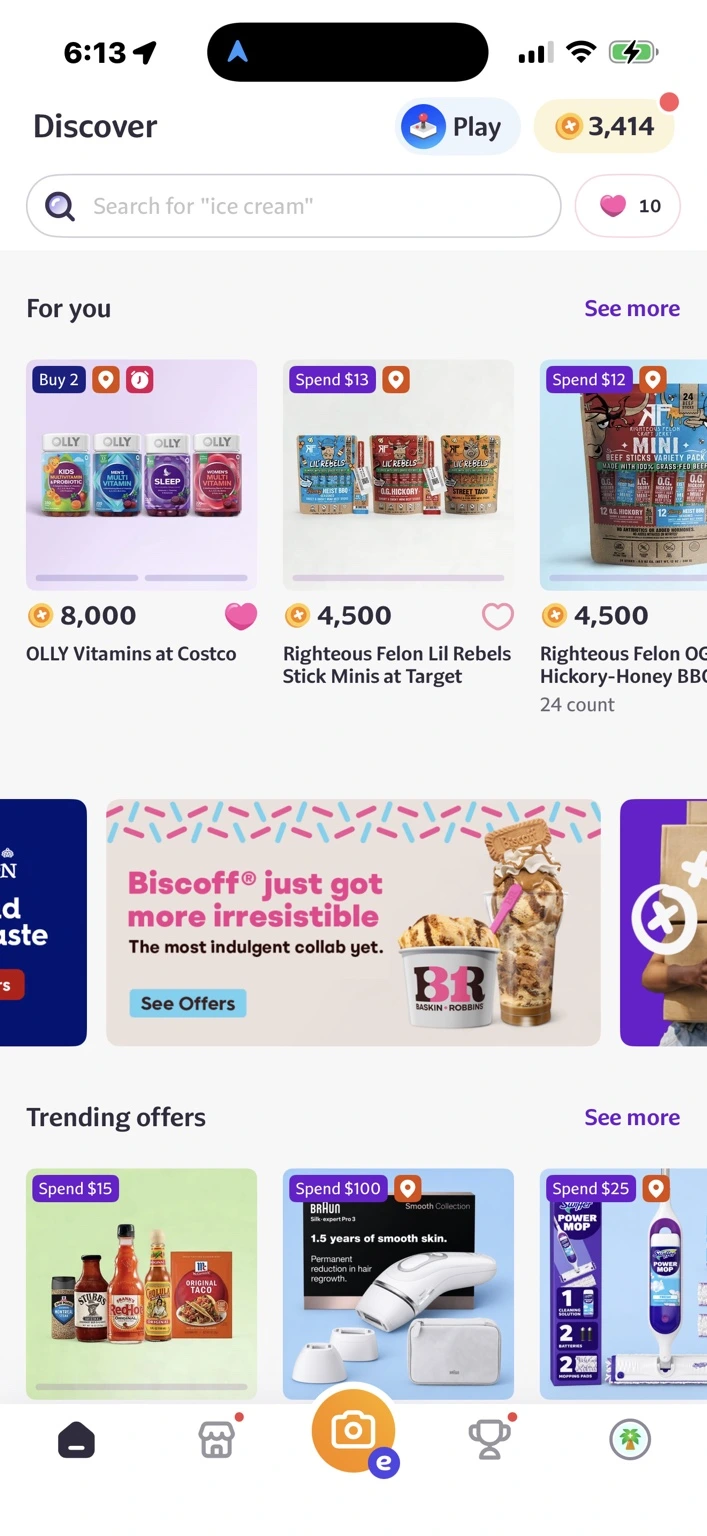
On the Discover tab, Fetch shows personalized offers. Some award extra points for a particular product. Others require multiple items, a spending threshold or a purchase at a participating retailer. The offers available to me may be different from the ones you see.
I’m not scrolling through every promotion to invent a shopping list. I’m checking whether detergent, cereal or something else I already need happens to have a worthwhile offer.
If You’re Already Checking Ibotta, Scoot Over to Fetch
When I make my grocery list, I may check Ibotta for cash-back opportunities. Then I scoot over to Fetch. It doesn’t need to become another 20-minute project.
I ask one question: Is Fetch rewarding something I was already going to buy? If the answer is yes, I read the terms and do the math. If not, I move on.
Do I Have to Clip Fetch Offers First?
In my experience, Fetch’s standard personalized offers don’t require a separate clipping step. Fetch’s terms say a receipt must be scanned while the offer is still in the app and must show a purchase that meets the offer’s terms.
Regardless of whether an offer requires clipping, the rules still matter. Check the required brand, size, quantity, retailer, spending threshold and expiration. Offers can disappear, and one that is no longer available may not qualify even if you purchased the product earlier.
My two modes are simple:
- Low effort: Shop → Scan → Collect eligible points.
- More intentional: Check Fetch → Find relevant offers → Shop → Scan → Collect eligible points.
Both fit my life. One just gives me more opportunities to earn.
Don’t Spend $10 to Chase $1 in Rewards
Here’s the rule that applies to every cashback and rewards app I use: The offer is not the deal. The final math is the deal.
If I planned to buy a $4 product, switching to an $8 alternative just to earn a small points bonus may leave me worse off. I look at what I actually need, what I would normally pay and whether the reward makes up for any price difference.
If it does, great. Take the points. If it doesn’t, keep scrolling.
MAXIMIZE IT
Let your shopping list lead. Let Fetch follow. Rewards should make intentional spending more valuable, not become an excuse to spend more.
What Does an Ordinary Receipt Really Earn?
Fetch currently gives at least 25 points for an eligible physical receipt. On its own, that adds up slowly.
| If every receipt earns only 25 points | Points earned |
|---|---|
| 10 receipts per week | 250 points per week |
| 20 receipts per week | 500 points per week |
| 10 receipts per week for four weeks | 1,000 points |
That last number is points, not dollars. Fetch reward prices vary, so there is no universal points-to-dollar conversion to assume from this example. Check the redemption price for the specific reward you want in your app.
This is why I think of Fetch as a combination of consistency + relevant offers + time. The 25-point receipts keep the habit going. Higher-value offers can make the bigger difference.
My Recent $50 Fetch Reward
I recently accumulated enough Fetch points to redeem a $50 Victoria’s Secret gift card.
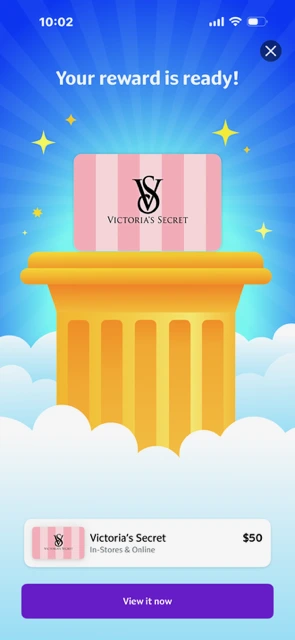
I didn’t scan one magical receipt and suddenly earn $50. I kept scanning. I benefited from offers. I accumulated points and eventually redeemed them for something I wanted.
That’s the experience I want readers to understand: little actions can become a useful reward, but they take consistency. This screenshot documents one real redemption, not a promise of how quickly someone else will earn the same amount.
How Long Does It Take to Earn a Meaningful Fetch Reward?
There isn’t one honest answer for everyone. It depends on how often you shop, how many eligible receipts you scan, which offers appear in your account and whether the products you already buy qualify.
If you rely only on 25-point receipts, a substantial reward can take a while. If you regularly match your existing shopping list to higher-point offers, your balance may grow faster.
I think of it as two Fetch experiences:
- Scan-only Fetch: Almost effortless, but slower if most receipts earn only the minimum.
- Strategic Fetch: Still simple, with an occasional look at promotions that match your actual needs.
I’ve used both. When I want to accelerate my points, I pay attention to the second one.
WERK NOTE
Don’t confuse easy rewards with fast money. Fetch is an ongoing rewards habit, not the app I turn to when I need cash today.
How Long Do Fetch Rewards Take to Process?
There are two separate clocks.
Clock one: Earning enough points. That could take weeks or longer, depending on your shopping and offers.
Clock two: Processing your redemption. Fetch currently requires 72 hours after you redeem your points before the reward is ready. Some rewards may also require activation or a security code before use.
I care about both clocks. A three-day processing period sounds quick, but it doesn’t tell you how long it took to earn the points in the first place.
Fetch Rewards Aren’t the Same as Cash in Your Bank Account
A gift card can absolutely free up money in your budget. If I use a $50 gift card for something I was already planning to buy, that’s $50 I don’t have to take out of my checking account.
But I’m careful not to call that the same thing as cash. Fetch is primarily a points-and-rewards program, and the rewards available depend on its current catalog.
When I redeem, I ask: What purchase will this reward replace? Maybe the money I would have spent stays in savings, goes toward debt or covers another expense. Maybe I intentionally use the reward for something fun. The point is to recognize the value rather than letting it disappear into random spending.
My Account Shows What Consistency Can Add Up To
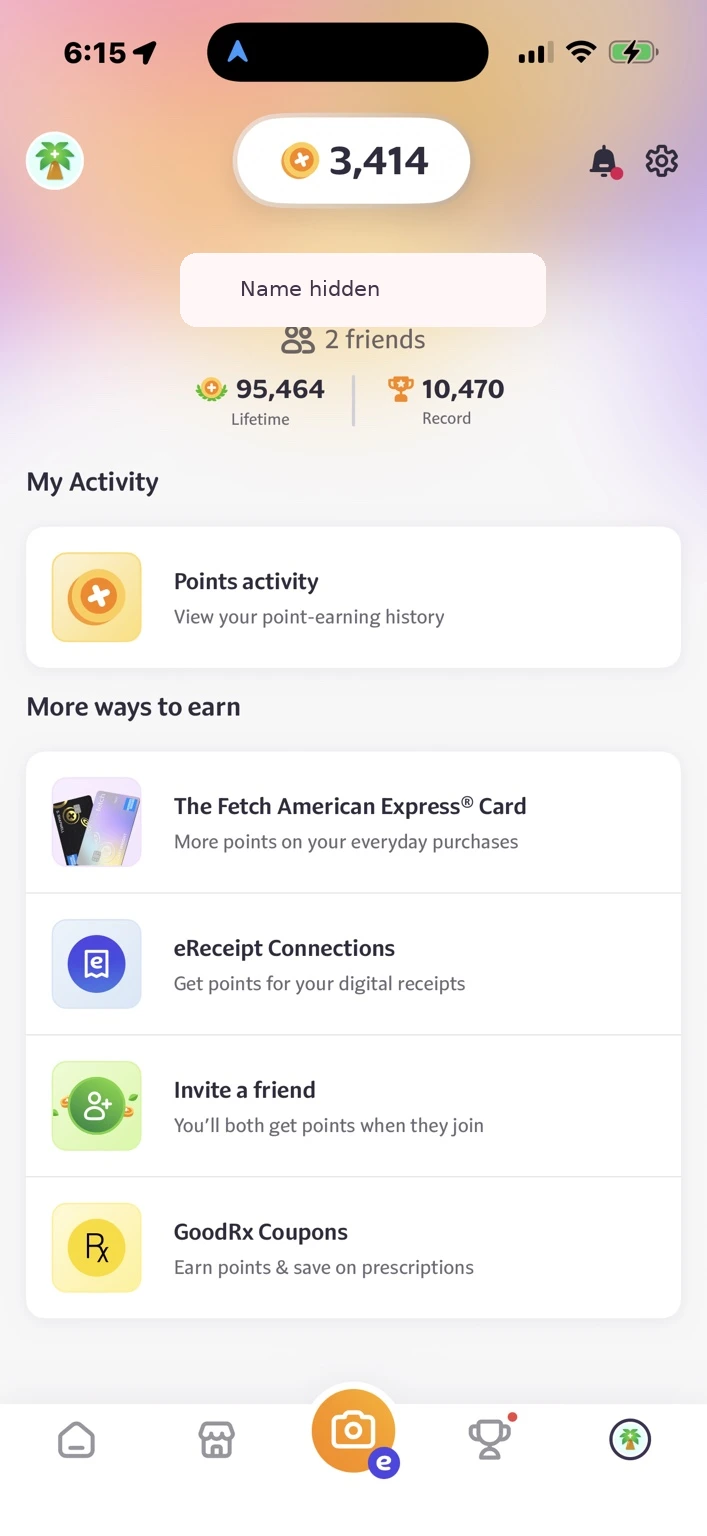
My Fetch profile screenshot shows 95,464 lifetime points and a 10,470-point record, with 3,414 points showing in my balance when I captured it. Those are snapshots of my own account—not typical earnings, a prediction or a fixed points-to-dollar conversion. They reflect activity accumulated over time, and the screenshot alone does not establish when I joined or how long it took to reach that total.
Other Ways to Earn: Shopping, Referrals and the Fetch Card
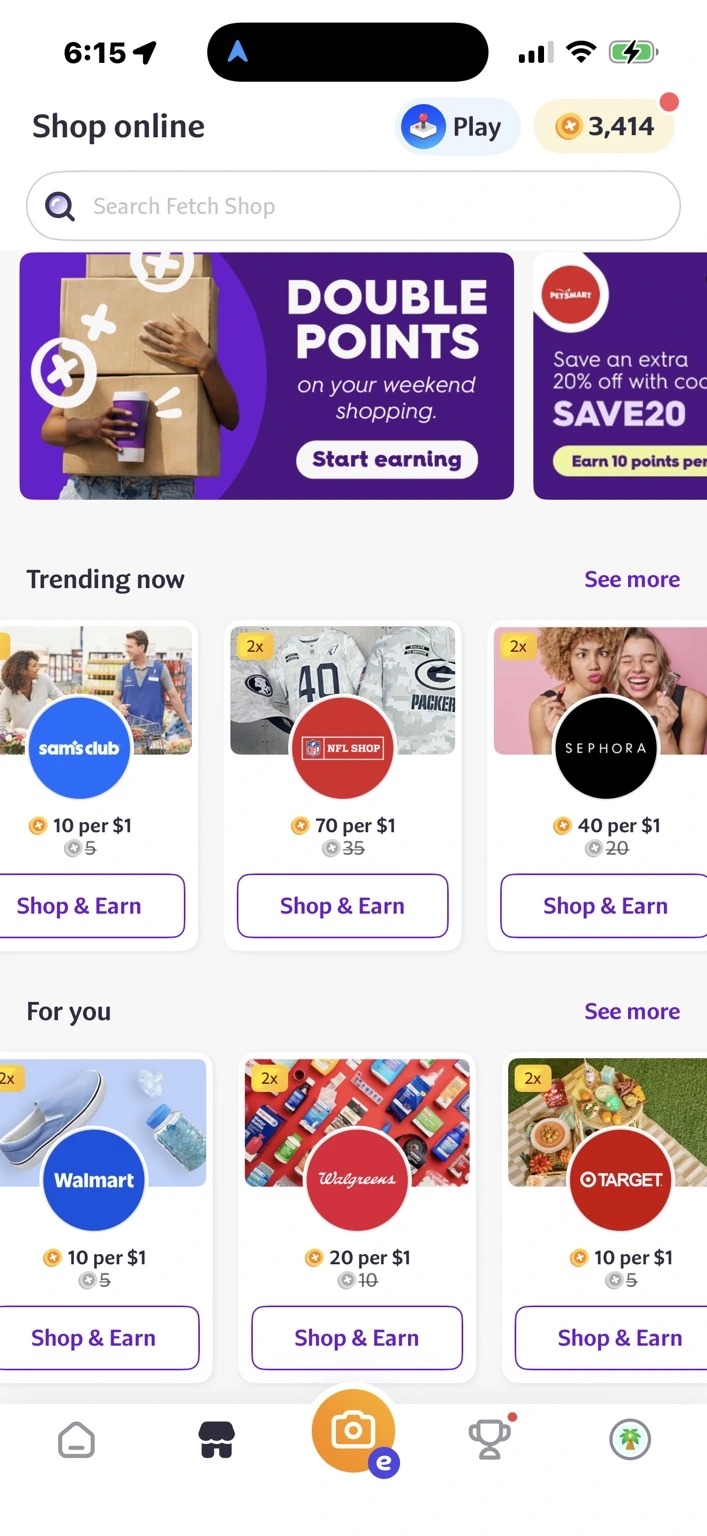
The Discover screen isn’t the only place I check. My Shop online screen showed temporary double-points promotions and participating stores with different points-per-dollar rates. In the screenshot, examples included Sam’s Club at 10 points per dollar, NFL Shop at 70, Sephora at 40, Walmart at 10, Walgreens at 20 and Target at 10. Those were offers displayed in my app when captured, not permanent rates or offers available to every user. Check exclusions, retailer terms and whether a promotion requires you to start your purchase through Fetch.
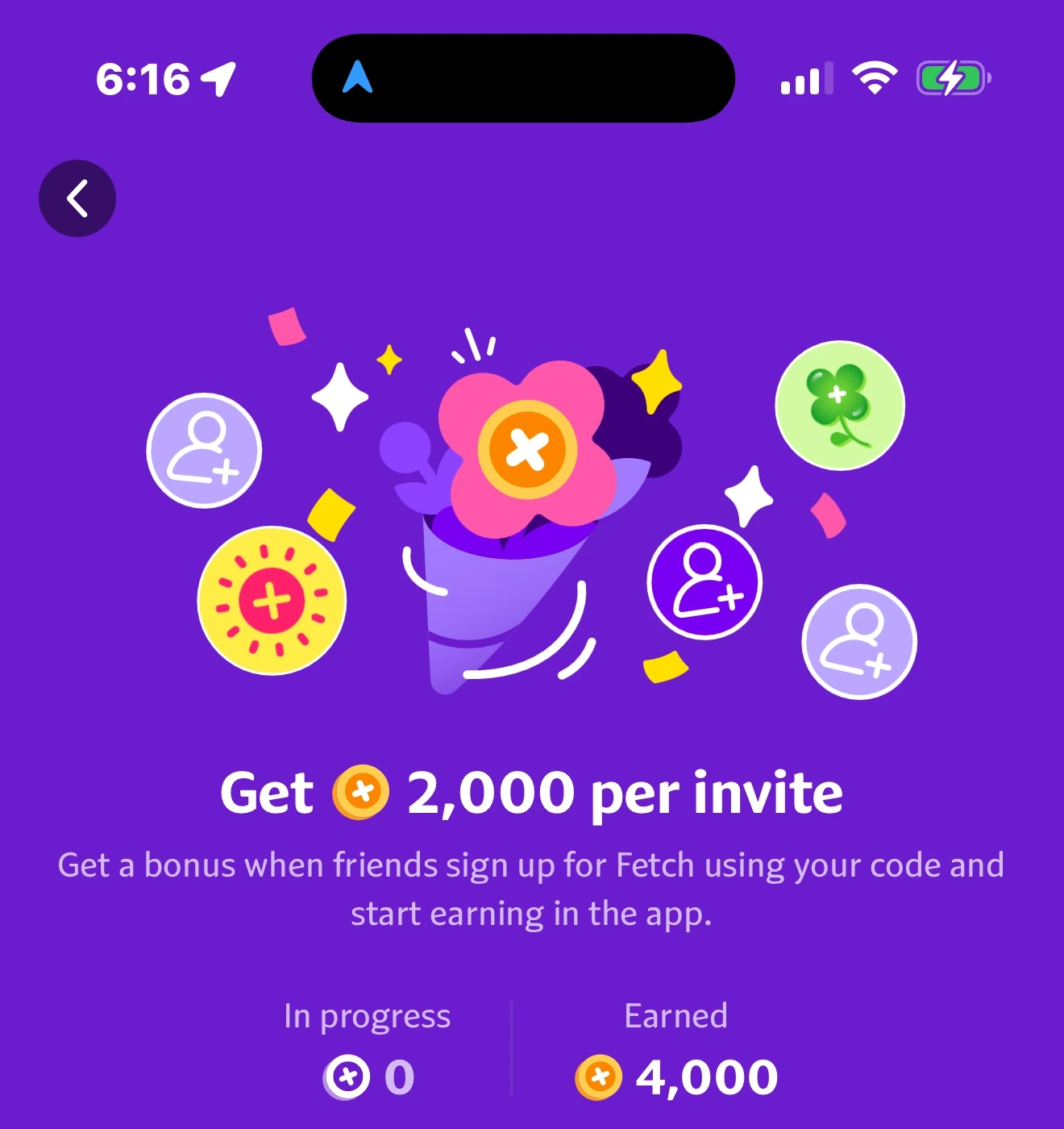
Fetch also has a refer-a-friend program. My screenshot advertised 2,000 points per qualifying invite and showed 4,000 points earned from referrals at that time. Referral bonuses change, and a friend generally has to sign up using the code and complete the qualifying action. If I share my code with readers, I’ll disclose that I may earn points when they use it.
What About the Fetch American Express Card?
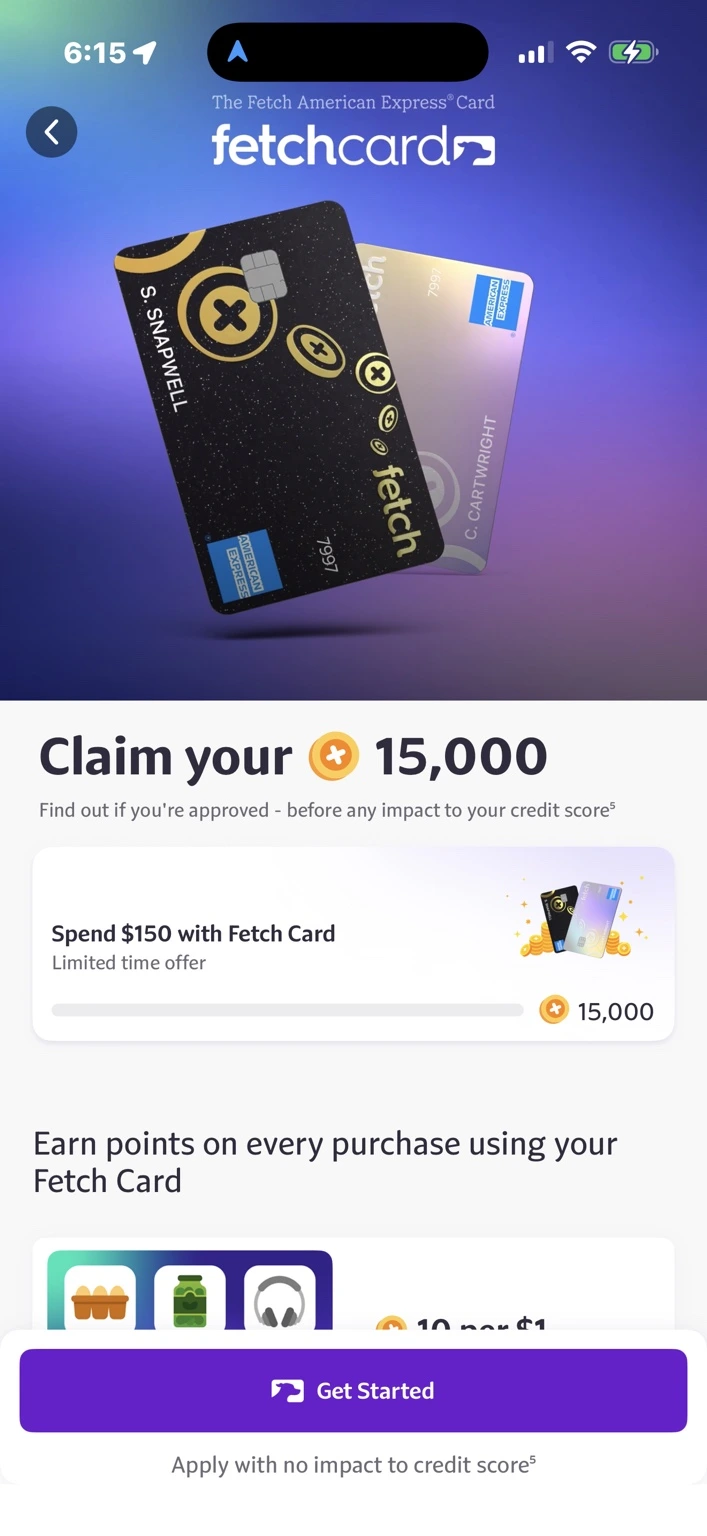
Fetch also advertises its own Fetch American Express® Card, a co-branded credit card powered by Imprint and issued by First Electronic Bank on the American Express network. Fetch’s published launch terms described 10 additional Fetch points per dollar on eligible grocery and retail purchases and five additional points per dollar on other eligible purchases, subject to card rewards terms. Its help center lists no annual fee. This is a credit card, not simply a linked American Express card that automatically earns Fetch points.
Official sources:
When I captured my screenshot, the app advertised a 15,000-point limited-time offer after $150 in Fetch Card spending. That is a historical example of an offer displayed to me, not a promise that it remains available. Approval, credit terms, eligibility and bonus requirements apply. Fetch says you can check whether you’re approved without affecting your score, but accepting an offer can involve a hard credit inquiry. I haven’t applied for or tested the card, so this is a look at an additional earning option—not my personal review of the credit product. I would never carry interest-bearing debt simply to earn points.
Beyond Paper Receipts: Three Ways to Earn Online
Fetch has expanded beyond physical receipt scanning. Its online options include eReceipts, Linked Offers and Fetch Shop, and they don’t all work the same way.
| Method | How it works | What to watch |
|---|---|---|
| eReceipts | Connect an eligible email or retailer account and submit qualifying online orders | Orders generally must be delivered or picked up and submitted within 30 days of receipt |
| Linked Offers | Start a qualifying purchase through a special in-app offer link | Some require an eligible eReceipt; others credit later, potentially taking up to 14 days |
| Fetch Shop | Start and complete a purchase through Fetch at a participating online retailer | Points can remain pending; timing depends on retailer and purchase type |
For Fetch Shop, some purchases may credit within days, while travel and retail purchases can take considerably longer—up to 60 days after travel or roughly 90–120 days for some retail transactions. Check the pending date in your account rather than assuming the points are immediately available.
And here’s an important distinction: Linked Offer points and Fetch Shop points do not stack on the same purchase. An eligible eReceipt may still earn additional qualifying offer points, depending on the transaction. An eReceipt alone does not trigger Fetch Shop points if you didn’t start and complete the purchase correctly through Fetch Shop.
GOOD TO KNOW
Don’t upload a screenshot of an emailed receipt and expect it to count. Fetch generally retrieves eligible eReceipts through supported connected accounts.
Check Fetch Before You Eat Out, Too
I associate Fetch with groceries, but I also keep an eye out for restaurant and nearby-store opportunities when I’m already planning to go out. Participating locations and offers can vary by area and account.
If there’s a useful offer at a restaurant I already want to visit, I’ll consider it. I’m not driving across town or manufacturing a dinner outing just because an app offers points.
The opportunity should fit my life. My life shouldn’t have to fit the opportunity.
Three Rules That Can Protect Your Points
- Scan receipts while they’re still eligible. Physical receipts generally must be submitted within 14 days. Fetch currently limits submissions to 35 receipts in a rolling eight-day period.
- Watch your inactivity clock. Fetch says points expire after 90 consecutive days of account inactivity. Scanning a receipt or redeeming a reward are among the actions that can keep your account active. Fetch says it sends email and text reminders before expiration, but I’d rather not rely on a reminder to protect a balance I’ve worked to build.
- Check offer details before counting on bonus points. Personalized offers can have retailer, product, quantity and timing restrictions. If an offer disappears, a purchase you made earlier may no longer qualify when you finally scan.
My Fetch Routine
I keep this intentionally uncomplicated. After shopping, I keep the receipt and scan it when I get home. Before a grocery trip, I sometimes check Fetch alongside Ibotta. If I’m eating out or shopping online, I look for relevant opportunities when it’s convenient. When I’ve built up enough points, I choose a reward I’ll actually use.
No extreme coupon binder. No driving to five stores. No buying eight boxes of something I don’t need. No turning saving money into a second job.
Fetch Pros and Cons
| What I like | What I watch |
|---|---|
| At least 25 points on eligible physical receipts | Base points accumulate slowly |
| Minimal effort to build a scanning habit | Rewards aren’t the same as direct cash deposits |
| Standard personalized offers haven’t required clipping in my experience | Offer terms vary and promotions can disappear |
| Relevant bonus offers can speed up accumulation | Big offers can tempt unnecessary purchases |
| Online and restaurant opportunities add flexibility | Different online methods have different rules and delays |
| A useful way to build rewards from existing spending | 72-hour redemption processing and 90-day inactivity expiration |
Is Fetch Worth Using in 2026?
For me, yes—because the effort is so low. I’m already shopping, and I’m already getting receipts. Scanning them takes very little extra time.
But I don’t pretend that 25 points here and there will produce a big gift card overnight. The rewards become more interesting when I’m consistent and occasionally spot an offer for something I genuinely need.
That’s why Fetch has two gears in my routine: scan without overthinking it and check before shopping when there’s an opportunity to earn more. Neither requires me to build my life around an app.
You’re already spending it. Give the receipt one more job before you throw it away.
Frequently Asked Questions About Fetch
How many points do I get for scanning a receipt?
Fetch currently awards at least 25 points per eligible physical receipt. Qualifying offers can add more. Receipts must meet its submission rules.
Do I have to activate Fetch offers before shopping?
In my experience, standard personalized offers haven’t required a separate clipping step. Fetch’s terms say the offer must still be in the app when you scan a qualifying receipt, and all offer requirements must be met.
How long do I have to scan a physical receipt?
Fetch currently requires physical receipts to be submitted within 14 days of the transaction and allows up to 35 receipts in a rolling eight-day period.
How long does it take to earn a gift card?
It depends on your receipt volume, bonus offers and the points required for your chosen reward. Base-only earning is typically slow; I don’t treat Fetch as fast cash.
How long does a Fetch reward take to process?
Fetch currently requires 72 hours after redemption. That is separate from the time needed to earn enough points.
Do Fetch points expire?
Yes. Fetch currently says points expire after 90 consecutive days of inactivity. Regular eligible activity, such as scanning receipts or redeeming rewards, can keep your account active.
Can I earn Fetch points on online shopping?
Yes, through eligible eReceipts, Linked Offers and Fetch Shop. Eligibility, stacking and processing times vary by method.
Can I scan someone else’s receipts?
No. Fetch says you may submit receipts only for purchases you made yourself.
Is Fetch good if I need money today?
That’s not how I use it. Fetch primarily provides points redeemable for rewards, and it can take time both to accumulate points and to process a redemption.
Editorial disclosure: This review reflects my personal experience. This article currently contains no affiliate or referral links. Any future referral or affiliate links will be clearly disclosed.